This article is for MSPs and cloud resellers using Ripple, and shows the value you can deliver to your clients with Guaranteed Commitments.
"What if it goes to waste?"
It’s often the first question clients ask when you recommend AWS Reserved Instances (RIs) or Savings Plans (SPs), referred to here as native commitments. AWS gives clients three main ways to pay: on-demand, a one-year commitment, or a three-year commitment. On-demand is fully flexible but has no discount. Native commitments cut costs significantly but lock clients in: if usage drops, they keep paying for capacity they no longer use. So many clients settle for the middle ground, committing only part of their usage and leaving the rest on on-demand pricing.
Guaranteed Commitments fills that gap. It pairs native commitments with a money-back guarantee, so your clients get commitment discounts while reducing the risk of paying for commitments that go unused.
You offer it through Ripple and Wave. In Ripple, you turn on Guaranteed Commitments for each client. In Wave, clients see the plans that fit their own usage, buy them directly, and track the savings each plan delivers. With their own data behind every recommendation, you can help clients cut cloud costs without buying commitments for each one yourself.
Guaranteed Commitment Plans and How to Recommend Them
Each Guaranteed Commitment has a minimum term, such as 30 days or 1 year, and can’t be canceled or refunded during that term. After it ends, if the usage a commitment actually covers drops and that month’s commitment cost exceeds what the covered usage would have cost on demand, the difference is refunded under the applicable terms. This applies not only when usage drops, but also when the discount isn’t applied, for example because discount sharing isn’t set up or the instance type doesn’t match. A 30-day term renews monthly and can be canceled in any following month. Canceling removes only the money-back guarantee and its Risk Premium; the underlying native commitment stays in place.
A Risk Premium applies. It’s a share of the savings the client actually realizes, and it isn’t charged in any month without net savings. Shorter terms carry a higher Risk Premium rate, so a 30-day term is built for flexibility and a 1-year term for a higher discount. Plans default to no upfront cost; partial upfront is available for certain eligible services. Clients see both in the plan details before they buy.
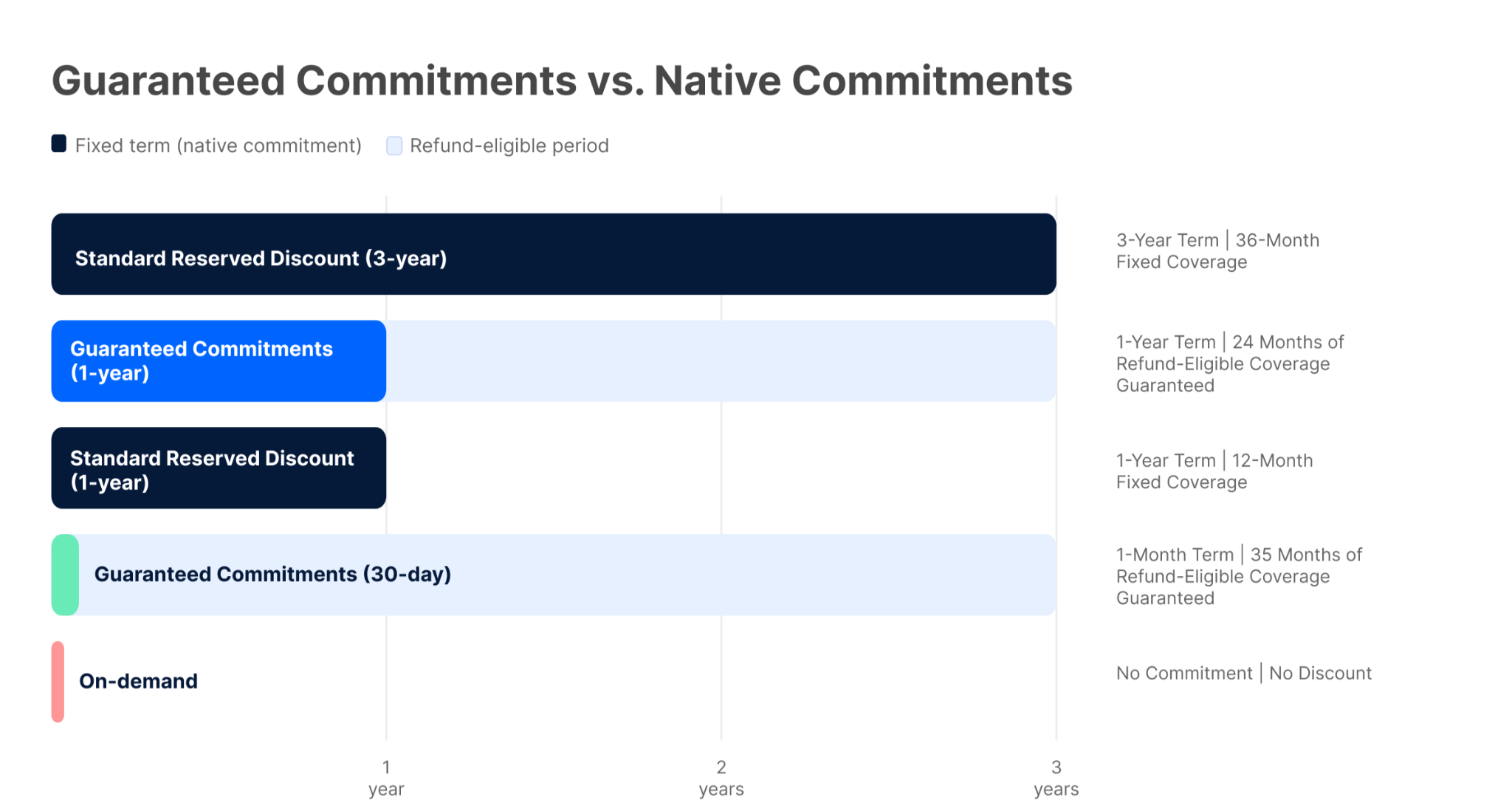
Guaranteed Commitments doesn’t replace native commitments. Recommending a mix based on each workload’s stability gives your clients both discounts and flexibility.
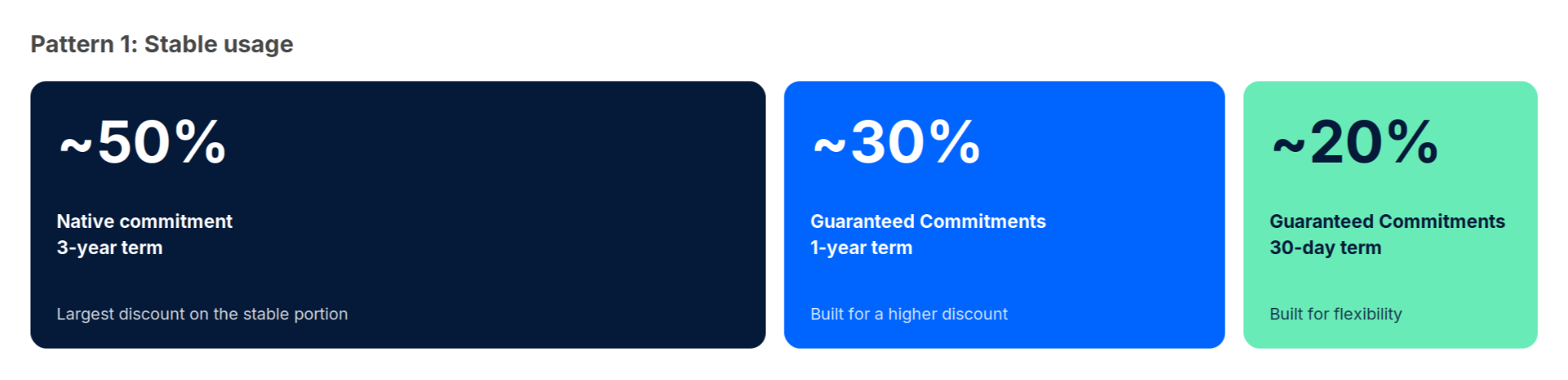
Pattern 1: Stable usage
For clients with stable usage, cover about 50% of the eligible usage they’re sure to keep long term with 3-year native commitments, which offer the highest discount rate, and fill the rest with Guaranteed Commitments. For example, put about 30% on a 1-year term and about 20% on a 30-day term. The stable portion gets the largest discount, and the portion that may change stays flexible.
Pattern 2: Highly variable usage
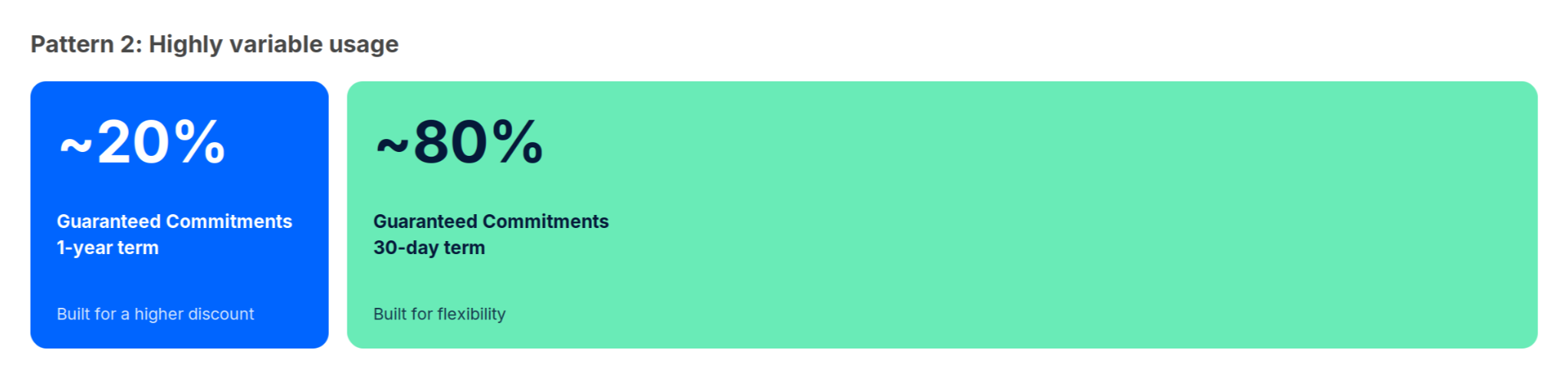
For clients with highly variable usage, skip 3-year native commitments. Cover about 20% of eligible usage with a 1-year term and the remaining 80% or so with a 30-day term. Your clients get discounts while staying flexible, even when usage is hard to predict.
Behind each Guaranteed Commitment is a native RI or SP, purchased in a dedicated account within the client’s own AWS Organization, with the money-back guarantee on top. So when a client launches a new service and can’t yet predict its usage, start them on a 30-day term. Once usage is stable and they’re sure to keep it, they can remove just the guarantee and keep the commitment as a native RI or SP. Without the Risk Premium, the discount is larger, but as with any native commitment, payments continue for the rest of its term.
Review the Wave Commitment Planner with each client to work out the split that fits their actual usage.
MSPs Use Ripple, Clients Use Wave
Lower financial risk doesn’t make commitment management go away. Someone still has to plan purchases, make them, set the rules, and check results afterward. That work usually falls to MSPs and cloud resellers, and in Japan, many still manage it by hand in Excel and disconnected tools.
Ripple and Wave split that work: in Ripple, you manage Guaranteed Commitments for all of your clients in one place, and in Wave, clients compare, buy, and track their own plans.
In short, you oversee and advise; your clients decide. You also earn revenue every time your clients purchase a Guaranteed Commitment through Wave.
One note on scope: Ripple handles billing across AWS, Microsoft Azure, and Google Cloud, but Guaranteed Commitments currently covers AWS RIs and SPs only. Support for Microsoft Azure and Google Cloud is planned. Everything below assumes AWS usage.
Manage Every Client’s Commitments in One Place with Ripple
Ripple is the platform MSPs use to manage client billing in one place. Its Guaranteed Commitment Manager extends the same model to commitment management.
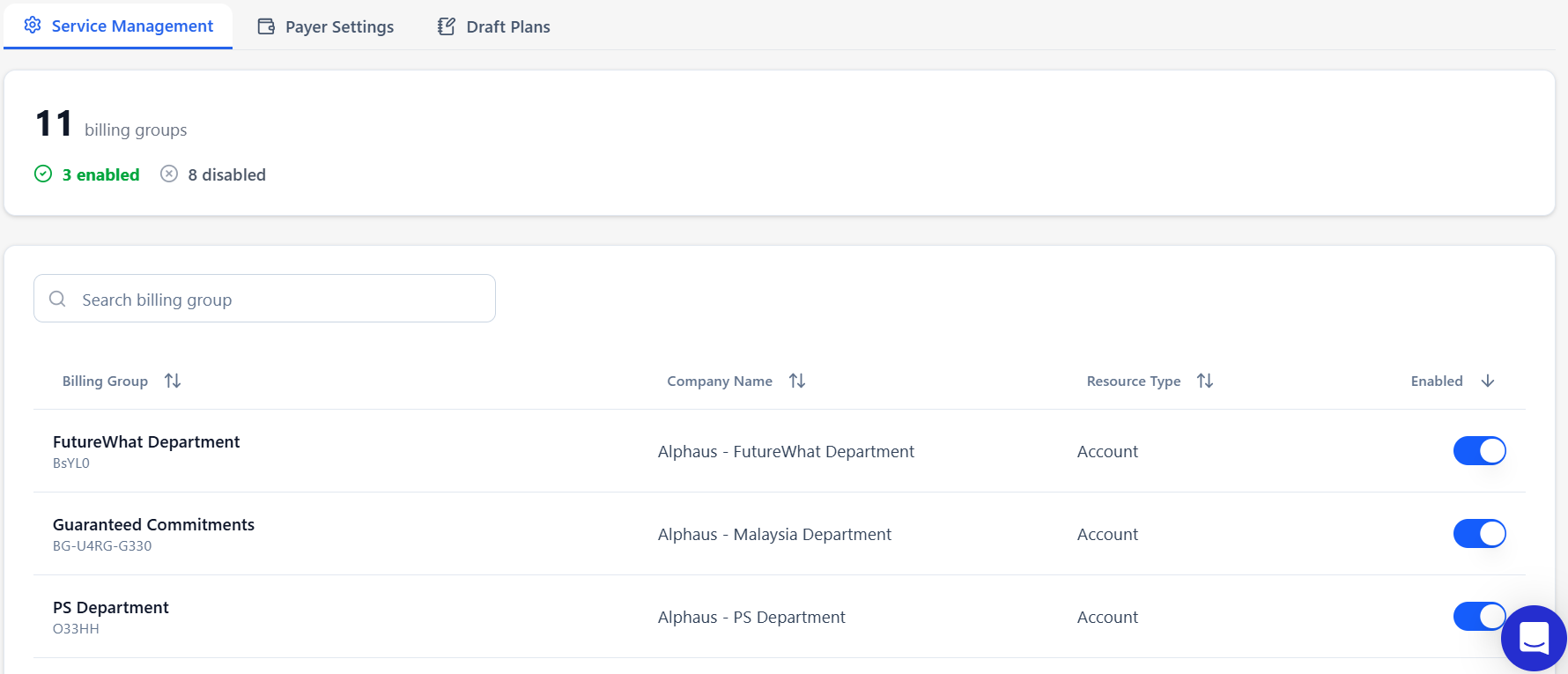
You switch the service on or off for each client’s billing group, deciding which clients can use Guaranteed Commitments. You can review each client’s payer account and setup status, see monthly savings across all clients in the Commitment Report, and open any client’s Wave view to check what that client has purchased.
You can also create your own plans in Ripple to supplement the system’s recommendations, with a minimum term you set. Each plan appears in the client’s Commitment Planner as soon as it’s created. Plans tailored to each client’s usage let you make recommendations that are distinctly your own.
Data-Backed Purchasing with Wave Commitment Planner
Once you enable access in Ripple, your clients can see Guaranteed Commitment recommendations, along with any plans you’ve created, in the Wave Commitment Planner.
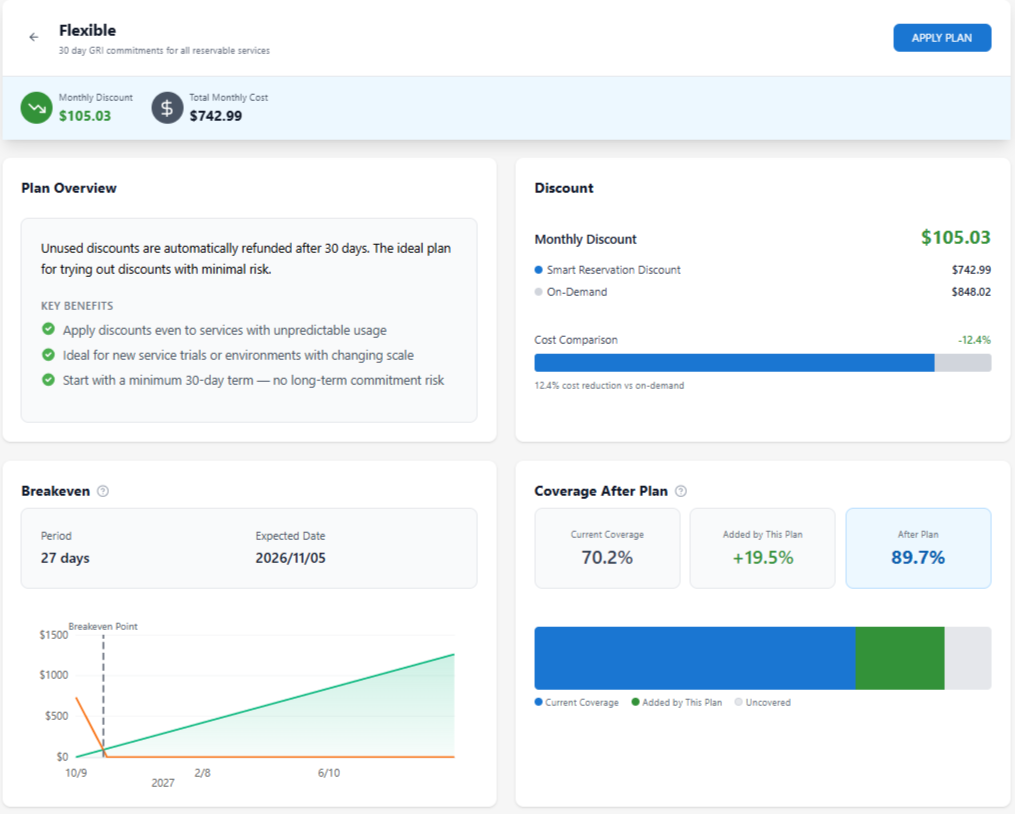
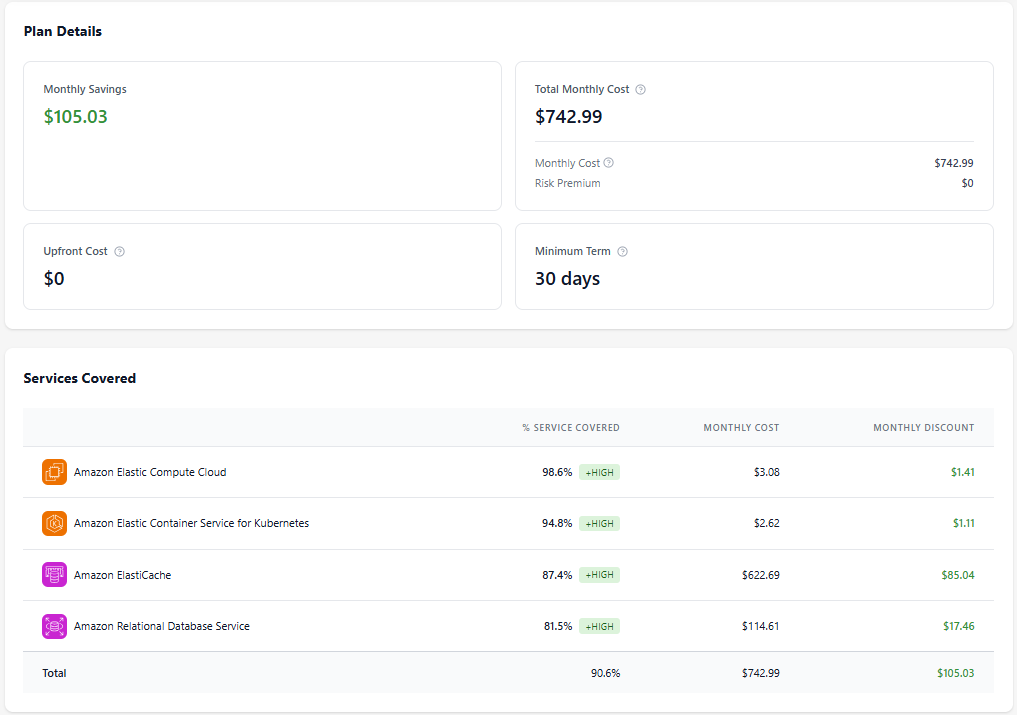
The Planner reads current cloud usage and active commitments from the connected AWS Cost and Usage Report (CUR) and recommends plans. Each recommendation shows estimated monthly savings, expected coverage rate (the share of eligible usage the plan would cover), required commitment term, days to breakeven, and the available plans. Clients can judge both cost-effectiveness and fit with their own usage before they buy, and you have the same numbers to back your advice.
Track Commitments After Purchase with Wave Commitment Inventory
Managing a commitment doesn’t end at purchase. Cloud usage changes over time, so your clients need to keep checking that the plans they bought still match how they actually use the cloud.
The Wave Commitment Inventory lists each Guaranteed Commitment your client has purchased. For each one, it shows utilization over time, monthly cost, and monthly savings, and commitment details such as the expiration date, payment option, and instance type. Utilization measures how much of what was purchased is actually being used, which is a different metric from the coverage rate shown in the Planner. When utilization starts to drop, or as a commitment’s expiration date approaches, review the Planner with your client and plan renewals.
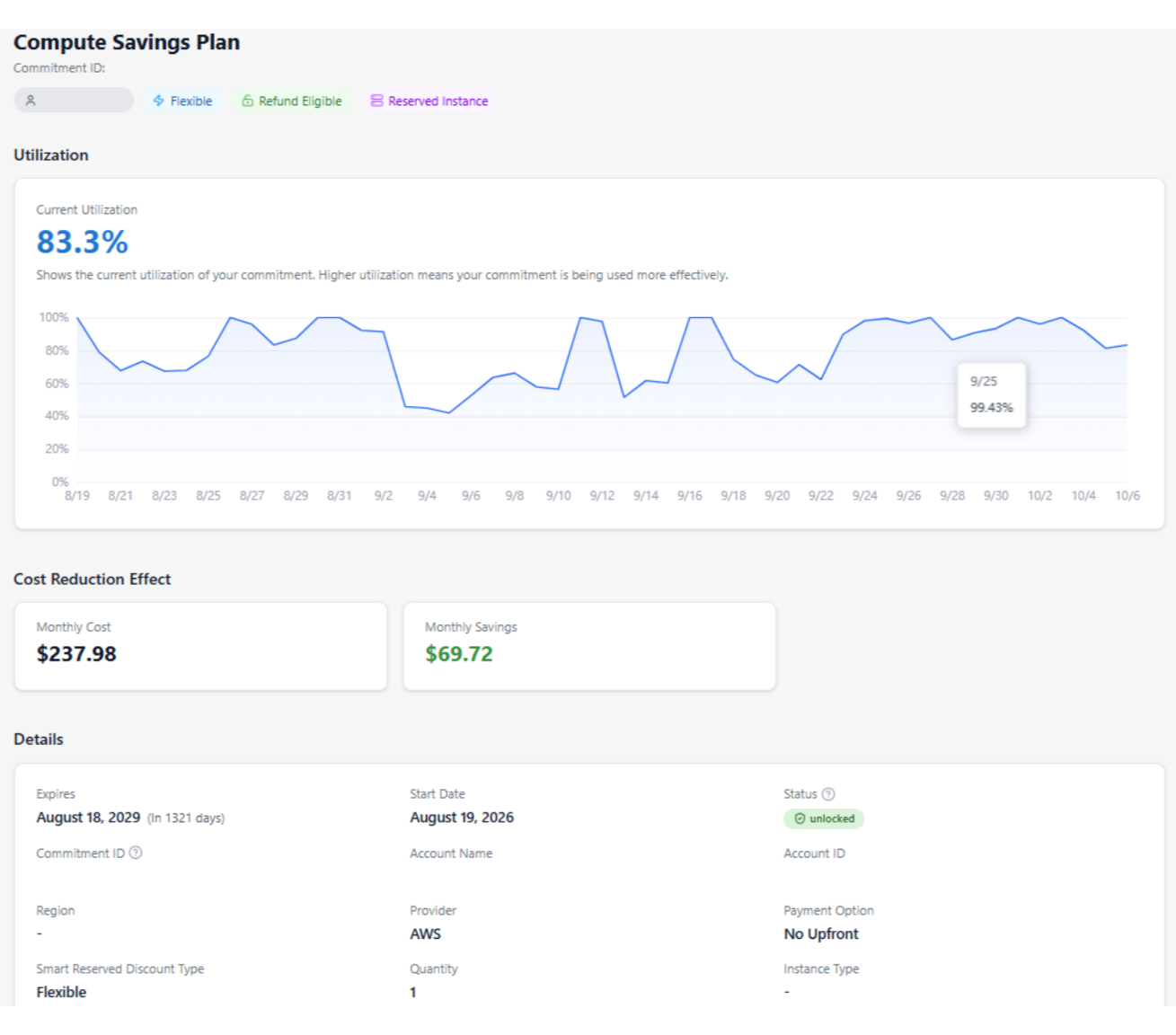
Because the data updates daily, clients don’t have to wait for periodic billing reports, and you spend less time compiling reports by hand.
From Operational Complexity to Shared Strategy
The value of this model goes beyond lower costs. It turns commitment decisions that used to rest on forecasts into a method you and your clients can understand and repeat.
Your role changes too. Because clients can check the data and purchase on their own, you no longer have to buy every commitment on their behalf, and administrative work drops. Instead of acting as a purchasing agent, you become a strategic advisor, helping clients decide which plans to combine and how.
This transparency doesn’t diminish your value. Over time, it builds client trust and turns one-off transactions into a long-term partnership.
As FinOps matures, partners will be judged not only on how much they save but also on how clearly they can show, explain, and justify those savings. The relationships that win will be built not on “trust me” but on “let’s check it together.”
Getting Started
Getting started takes three steps in Ripple’s Guaranteed Commitment Manager: connect each client’s payer account, turn on Guaranteed Commitments for their billing groups, and give Wave users access. The guides below walk you through each step.
How to Set Up the Guaranteed Commitment Manager in Ripple →
How to Use the Commitment Planner in Wave →
If you have any questions, contact Alphaus →